Blingz
ApperfunEntertainment
4.61.10K Reviews
- Version
- 1.63.1
- Installs
- 100.00K
- Age Rating
- Everyone
Screenshots
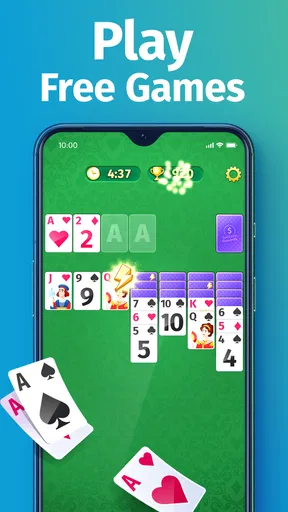
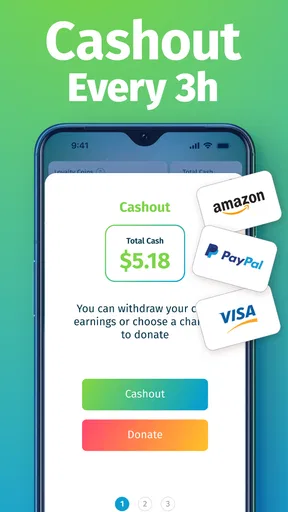
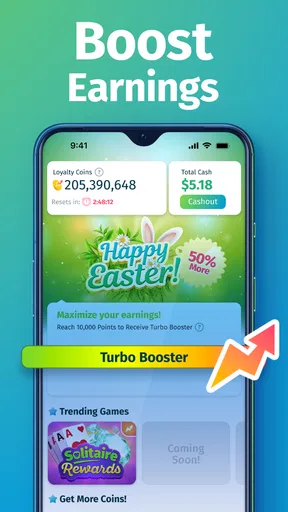
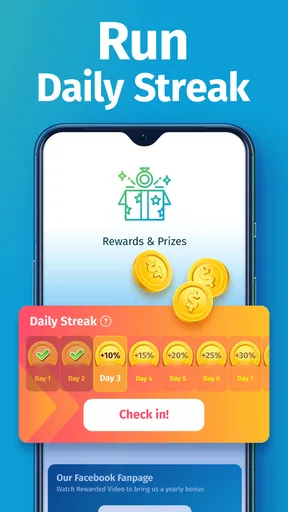
Our Review of Blingz
 Analysis by Appyee
I approached Blingz as a small entertainment app built around the idea of playing and earning, and my first impression was that its appeal depends less on flashy presentation than on how smoothly the basic routine fits into your day. It is free to use, aimed at Everyone, and comes from Apperfun. The concept is easy to understand, but apps in this space are judged by the details: how quickly you can get started, whether progress is easy to follow, and what happens when a task, session, or reward does not appear as expected.
The app has a 4.6 average from around 7,700 ratings, with more than 100,000 installs. Those figures suggest that Blingz has found an audience, although they should not be mistaken for a promise that every user will have the same experience. I found it most interesting as a casual way to fill short gaps in the day rather than as a replacement for a normal income or a serious gaming platform. That distinction matters before you install it.
What Blingz feels like in everyday use
The central attraction is straightforward: spend time playing and look for opportunities to earn. That makes the app easy to explain to a friend, but it also creates a natural question: is the entertainment enjoyable on its own, or does the earning angle do all the work? In my view, Blingz is best approached with both expectations in balance. If you already enjoy casual mobile play, the reward element can make spare minutes feel more purposeful. If you dislike repetitive tasks, the promise of earning may not be enough to keep you interested.
I would use it in situations where I have a short, defined break: waiting for an appointment, taking a train, or winding down before bed. I would not open it expecting a deep game with a long-term story, complex strategy, or the same polish as a major premium release. Its value is in being accessible and easy to revisit, not in replacing the most ambitious games on Android.
The current release is version 1.63.1 and supports devices running Android 8.0 or later. That makes checking your phone’s software an important first step. A compatible device is not automatically a trouble-free device, though. Storage pressure, an unstable connection, battery restrictions, or an outdated system component can make an app appear unreliable even when the application itself is working normally.
Where new users can get stuck
The first friction point is usually expectation-setting. “Play and earn” sounds immediate, while real use often involves completing an activity, waiting for progress to register, and understanding what the app considers a completed action. I recommend reading each on-screen instruction before starting rather than tapping rapidly through the first screens. A few seconds of attention at the beginning can prevent confusion later, especially if you are trying to work out why a session did not count.
Another common stumbling block is switching away from the app too quickly. On some phones, background activity is restricted to preserve battery. If you begin an activity and immediately lock the screen, open several other apps, or let the operating system put Blingz to sleep, the result may not be recorded as you expected. This is not a reason to disable every battery safeguard on your phone. It is a reason to test the app with one short session while keeping it in the foreground and observing what changes afterward.
Connection quality can also affect the experience. A weak signal may leave a page loading, delay an update, or make it unclear whether an action has been accepted. When that happens, repeatedly tapping the same control is usually a poor recovery method. It can create duplicate attempts or simply make the interface feel more confusing. I prefer waiting briefly, checking whether the screen changes, and then reopening the relevant area once rather than pressing everything several times.
There is also a practical attention cost. Reward-focused apps encourage users to keep checking progress, but constant checking can make a simple activity feel like administration. My advice is to decide in advance how long you want to use Blingz and stop when that time is up. That keeps the app in its proper role as casual entertainment instead of turning every spare moment into a search for the next task.
Setup checks that save time
Before judging the app, I would run through a simple setup routine. First, confirm that the phone meets the Android requirement and has enough free space for ordinary app operation. Second, install or update it through the normal app store process rather than relying on an old copy. Third, open it on a stable connection and allow the initial screens to finish loading before starting anything. These are basic steps, but they separate installation trouble from usage trouble.
It is also worth checking the phone’s date and time settings. An incorrect clock can cause problems in many apps that communicate with online services or track time-sensitive activity. I would leave automatic date and time enabled unless I had a specific reason not to. This is a general troubleshooting check, not a claim that every problem in Blingz comes from the clock.
Notifications deserve a thoughtful approach. If you want reminders, enable only the alerts that are useful to you. If you prefer a quiet phone, keep notifications limited and open the app manually when you choose. A crowded notification shade can make an entertainment app feel more demanding than it really is, and turning on every alert does not improve the quality of the underlying experience.
On Android, battery optimization can be checked if progress repeatedly fails to update while the app is open. I would not begin by changing aggressive system settings across the whole phone. Instead, test one session normally, then compare it with a session in which Blingz is kept visible and the phone is not placed in a restrictive power mode. This controlled approach makes it easier to identify whether background management is involved.
Permissions should be handled with the same common sense. Grant what is clearly required for the parts you intend to use, and review the choice if you change your mind later. I would avoid approving requests automatically just because the app is free. At the same time, I would not assume that refusing an optional permission means the entire service is broken; it may simply limit a particular part of the experience.
A better workflow for play and earning
My preferred workflow is deliberately simple. I open Blingz, look at the available activity, choose one manageable option, and stay with it long enough to see whether the app registers progress. I then check the result before closing the app. This creates a clear beginning and end, which is more useful than jumping among several activities and later trying to remember what should have counted.
For a realistic everyday example, imagine having fifteen minutes before a bus arrives. I would start by checking the connection, select one activity, and avoid switching between apps until the session is clearly finished. If the bus arrives before the result appears, I would not keep tapping while walking or boarding. I would close the app safely and return later, rather than allowing a rushed session to create uncertainty about the status of the activity.
One non-obvious advantage of this approach is that it gives you a personal baseline. After a few short sessions, you can tell whether the app usually updates immediately, needs a refresh, or behaves differently when the connection changes. That knowledge is more valuable than guessing from a single failed attempt. It also helps you decide whether the time spent is worthwhile for you personally.
I would keep a mental distinction between three stages: starting an activity, completing it, and seeing the result reflected in the app. If something goes wrong, identify which stage failed. A start problem points toward loading or connection issues. A completion problem may involve leaving the app too soon or not following the on-screen requirement. A display problem may be resolved by returning to the relevant screen or reopening the app. Treating all three as the same error usually leads to unnecessary frustration.
Another useful habit is avoiding rapid repeated actions. When an app is slow, users often press a button again and again because they want reassurance. In practice, this can make it harder to tell what happened. I would wait, observe, and use one recovery step at a time. That is especially important when an activity involves progress, because a delayed response can look like a failed response even when the app is still catching up.
Recovering when progress looks wrong
If an activity appears not to have counted, my first step would be to return to the same screen and check whether the status has updated. If it has not, I would close and reopen the app once, then test with a short activity rather than immediately repeating a long one. This protects your time and gives you a cleaner troubleshooting result.
Next, I would check the connection without making several changes at once. Moving from weak mobile reception to a reliable Wi-Fi connection, or vice versa, can reveal whether the issue is network-related. If the app works after the change, the original problem may have been connectivity rather than the activity itself. If nothing changes, I would continue with device-level checks instead of assuming that repeating the task will solve it.
Restarting the phone is an underrated recovery step, particularly after the app has been open for a long time or the device has been under heavy load. I would also close other demanding apps and make sure the operating system is not in an extreme power-saving mode. These actions are safe, reversible, and more sensible than clearing everything immediately.
Clearing an app’s cache can sometimes help with a damaged temporary file, but it should not be the first response if you are unsure what the option does. I would use it only after noting any information I may need to sign in again. Clearing storage is more disruptive because it can remove local app data, so I would treat that as a last resort and not as a routine fix.
When a problem continues, record the useful details: what you were doing, whether the connection changed, whether the app was in the foreground, and what the screen showed afterward. This makes any support conversation clearer. It also prevents the common mistake of reporting only that “it does not work,” which gives neither you nor the developer enough information to identify the failure.
When Blingz is not the cause
It is easy to blame the app when the real issue is the phone or network. If other online apps are also slow, the connection is the stronger suspect. If the entire device is freezing, overheating, or closing applications, the problem may be system load or available storage. If only one activity fails while other parts of Blingz behave normally, the issue may be specific to that activity rather than the whole application.
Account and store-related problems can also be separate from the app’s interface. An installation that stops halfway, an update that will not complete, or a sign-in loop may involve the app store, the device account, or connectivity. I would test the store with another ordinary update before concluding that Blingz is responsible. This avoids changing app settings when the installation environment is the actual source of the trouble.
Users should also remember that earning-oriented entertainment has a trade-off: the reward promise can make small delays feel more serious than they would in a normal casual game. A loading pause in a puzzle game is annoying; a loading pause when you are expecting progress can feel like lost effort. That is why I recommend short test sessions and realistic expectations. Do not commit a large block of time until the basic loop feels dependable on your own device.
Blingz is not the best choice for someone seeking a fully featured game, a guaranteed financial return, or a completely passive experience. A traditional free game may be better if you care mainly about gameplay depth and do not want reward tracking to influence your choices. A paid game may be better if you want fewer interruptions and a more focused design. Conversely, Blingz makes more sense for someone who likes casual play and is comfortable treating earning as an extra reason to open the app, not the sole justification.
Who should try it and who should skip it
I think Blingz suits curious casual users who enjoy experimenting with short entertainment sessions. It is also a reasonable option for people who want something lighter than a large game installation and who are willing to monitor how well the app behaves on their particular phone. The free price lowers the barrier to trying it, while the Everyone rating makes it broadly approachable for its intended audience.
I would advise skipping it if you are likely to become frustrated by delayed updates, repetitive routines, or the need to check that an activity registered. I would also skip it if you are installing purely because you expect meaningful income. No reward-based entertainment app should be treated as a substitute for dependable work, and the time-versus-benefit calculation will differ from one person to another.
Parents and younger users should still apply ordinary device supervision even with an Everyone rating. The age label describes the app’s content suitability, not how much time someone should spend on it or how carefully reward-related activity should be understood. Setting a time limit and discussing expectations is more useful than assuming the rating answers every practical question.
My practical verdict
After looking at both the appeal and the friction, I see Blingz as a casual entertainment app with a clear hook and a narrow best use case. Its strongest point is accessibility: you can try the play-and-earn idea without paying for the download, and the concept is simple enough to understand quickly. Its weakness is that the experience depends heavily on smooth progress tracking and on the user keeping expectations realistic.
The best way to evaluate it is not to chase every available opportunity on the first day. Start with a short session, use a stable connection, keep the app in the foreground while testing, and confirm that progress behaves as expected. If the routine feels clear and the entertainment is enjoyable even without focusing constantly on the reward, Blingz may earn a place among your occasional phone activities.
Apperfun’s app is currently on version 1.63.1, and its audience has already grown beyond a small experiment, with more than 100,000 installs. I would still make the decision based on your own tolerance for casual repetition and troubleshooting rather than popularity alone. For me, the fairest conclusion is that Blingz is worth trying as a low-commitment pastime, but only when you treat the earning angle as a bonus and judge the app by the quality of its everyday workflow.
Verdict
Strengths of Blingz
- Simple interface makes the app easy to navigate from the first use.
- Quick access to core features keeps everyday interactions convenient.
- Lightweight design should run smoothly on many modern Android and iOS devices.
- Useful notifications can help users stay updated without opening the app repeatedly.
- Suitable for casual users who prefer a straightforward mobile experience.
Limitations of Blingz
- Some features may require an account or personal information to access.
- The experience can feel limited for users seeking advanced customization options.
- Notifications may become distracting if too many alerts are enabled.
- Performance and availability may vary depending on device and network quality.
- The app’s usefulness may depend heavily on having an active Blingz community.
Other Releases by Apperfun
View All
Solitaire Rewards
Card4.7
Similar Picks in This Category
View All
Google Play Games
Google LLC3.9

Netflix
Netflix, Inc.4.8

YouTube Kids
Google LLC4.2

Disney+
Disney4.4

Prime Video
Amazon Mobile LLC4.7

Steam
Valve Corporation3.2
Frequently Asked Questions
What is Blingz and what can I use it for?
Blingz is a mobile entertainment and social app designed around interactive content, user engagement, and reward-style features. Depending on the version available in your region, you may be able to explore content, complete activities, interact with other users, or collect in-app rewards. Before downloading, check the current store description because features, supported countries, and the exact purpose of the app can change over time.
Is Blingz free to download and use?
Blingz can generally be downloaded at no initial cost, but free access does not necessarily mean that every feature is completely free. The app may include advertising, optional purchases, subscriptions, or other paid elements. I recommend reviewing the payment details shown in the Google Play Store or Apple App Store, especially if the app involves rewards, premium content, or activities that require credits.
Is Blingz safe for my personal information?
Before creating an account, review Blingz’s privacy policy and the data-safety information listed on its official store page. The app may request details such as an email address, profile information, device data, or usage activity. Only provide information that is necessary, use a strong unique password, and avoid sharing sensitive financial or identity documents unless the service clearly explains why they are required.
Does Blingz offer real rewards or cash withdrawals?
If Blingz promotes points, prizes, or cash-style rewards, users should carefully read the eligibility rules before investing time in the app. Reward availability may depend on location, minimum thresholds, verification, limited offers, or account restrictions. Check withdrawal methods, processing times, expiration rules, and any fees. Treat reward claims cautiously and never pay money simply to unlock a promised payout.
Which devices support Blingz, and does it require an internet connection?
Blingz is intended for compatible Android and iOS mobile devices, although the precise operating-system requirements may vary between releases. An internet connection is usually needed for account access, content updates, advertisements, synchronization, and reward-related functions. For the smoothest experience, install the latest official version from your device’s app store and confirm that you have enough storage and a supported system version.
